How to Install the Official Plugin for Hosting Unity WebGL Builds
This article explains how to download and install the Official Plugin for uploading Unity WebGL games to FinalParsec.
How to Install the Official Plugin for Hosting Unity WebGL Builds
1. Download the latest release of the Official Uploader Plugin here
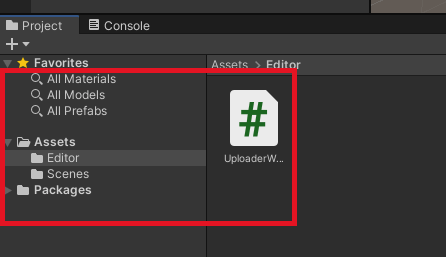
2. In your Unity project, create an Editor folder in the Assets root directory if you don’t already have one. And copy the UploaderWindow.cs script into it.
This folder allows us to add functionality to Unity during development.
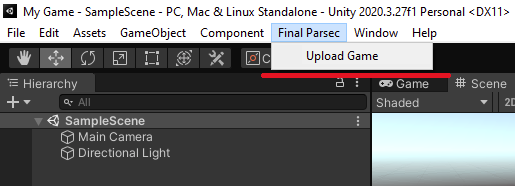
3. Congratulations! Now you should see the Final Parsec window and the Upload Game sub item.
Learn how to upload your first game.
Recommended posts
We have similar articles. Keep reading!
Creating game sprites used to take hours of painstaking work, drawing frame by frame, tweaking pixels, and hoping the animation felt right. AI-generated art enables you to create a whole sprite sheet in seconds, but it still takes some effort to get it pixel-perfect and ready to use in a game. In this post, we’ll show you how to take AI art and transform it into a polished asset that moves fluidly, letting you focus on building your game instead of wrestling with every frame.
Sharing prototypes early helps shape better games. In this post, I show how I use Final Parsec to instantly deploy and share my Godot builds for fast, browser-based feedback.
The secret to game dev success? Small steps, daily habits, and the courage to ship—even when it’s not perfect.